


All Video Downloader HD Player
3.92.00 Reviews
App Specs
- Version
- 2026-04-22 17:38
- Updated On
- License
- Free
- Downloads
- 1,000,000+
- Developer
- Jason Johnson Tech
- Categories
- Video Players & Editors
- Platform
- Android
Screenshots

 Analysis by AppCompare
I judge a video downloader less by a promise of speed than by how much fuss it adds to the simple job of saving something for later. All Video Downloader HD Player combines downloading with playback, so its appeal is practical: move a video from a social-media browsing session into a place where you can watch it offline. That can suit a commute or a patchy connection, but it is not automatically the right answer for every site or viewing habit.
As a free video player and editor app from Jason Johnson Tech, it sits in a crowded category where many phones already have a capable media player and browsers can handle ordinary viewing. Its average rating is 3.9 from around 4,300 ratings, while the install count is over a million. Those figures suggest that plenty of people have tried it, but they do not tell me whether a particular video source will work smoothly on your device. I would treat it as a focused utility to test with the sources you actually use, rather than a universal downloader.
What to expect when starting a download
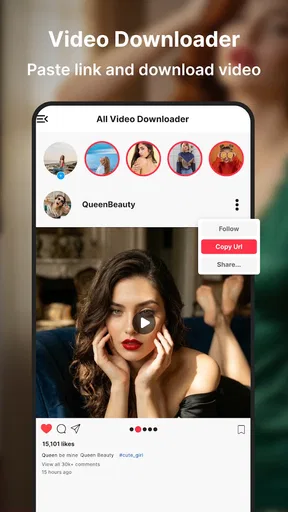
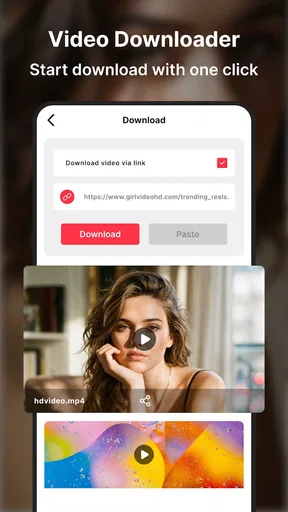
The basic idea is easy to understand: find a video in the app’s browsing experience, start a download, then play the saved file without returning to the original page. That short route is the main convenience. In everyday use, the first thing I would check is whether the video offers a downloadable option and whether the resulting file plays as expected. A social-media page can contain several kinds of media, and a visible video is not a guarantee that every source will behave the same way.
Speed is also more than an app-level feature. The source, connection quality, file size, and free space on the device all affect how long a download takes. I would not plan around every clip arriving instantly, especially on mobile data or a busy connection. For a short item on reliable Wi-Fi, the process may feel quick; for a large, high-resolution file, waiting is normal. If a download seems slow, checking the connection and available storage is a more useful first step than repeatedly tapping the control.
The app is free and rated for Everyone, making it easy to try without a purchase decision. It was released on March 17, 2026, and its current version is marked 2026-04-22 17:38. It supports devices running Android 8.1 or later. Those details matter most if you are deciding whether an older phone can run it: meeting the minimum system requirement is a starting point, not a promise that large files will feel effortless on hardware with limited storage or memory.
Using it for real viewing habits
When I think about using this app regularly, the useful question is not just whether a clip can be saved, but whether it will be ready and easy to find at the moment I want it. I’d build a small, deliberate offline queue and check each file before relying on it away from Wi-Fi. That habit also makes it easier to notice when a source or device constraint is affecting the result.
A useful routine for travel and limited data
A realistic use case is preparing a few clips at home before a train ride. I would browse and save only the videos I genuinely expect to watch, then open the player before leaving Wi-Fi. This gives me a chance to check that each file is present and playable while I still have a stable connection. It also avoids the common annoyance of discovering halfway through a trip that a page depends on an internet connection after all.
Worth Reading Before You Choose

EA SPORTS FC Mobile 26 Is a Bigger Football Game, but It Takes Time

Flipboard Shows What News Apps Must Do Beyond the Feed

Switching to Android Auto Means Rethinking Your Driving Routine

Google Calendar Makes a Crowded Week Easier to Manage

Ludo King Makes the Most of the Minutes Between Plans

Baby Panda World Brings Quick Play to Modern Phones, but Its Game Library Feels Busy
There is a small but worthwhile organization habit here: give a downloaded file a recognizable name or keep related items together, if those controls are available in your workflow. A filename that reflects the subject is much easier to find later than a string of generic labels. I would also periodically remove clips I have finished watching. Offline video can quietly consume storage, and keeping only what I need makes the app and the rest of the phone easier to manage.
This is where a downloader-player combination can be more convenient than switching between a browser, a separate file manager, and a general-purpose player. The trade-off is that a dedicated app becomes another place to manage content. If you already save media through a browser and have a player you like, adding another tool may not simplify anything. The advantage is strongest for someone who wants one repeatable route from browsing to offline playback.
Where the convenience has limits
I would not assume that every social platform allows every video to be saved. A downloader can only work with what the page and source make accessible, and some media may be restricted or presented in a way that does not produce a usable file. Respect the creator’s rights and the platform’s rules; saving a clip for personal offline viewing is not the same as having permission to repost or distribute it.
Quality choices also involve a practical compromise. A higher-resolution file can look better on a large screen, but it needs more storage and may take longer to save. For a quick watch on a phone during a commute, a smaller option may be the more sensible choice if one is offered. For a clip with fine detail that you intend to keep, choosing quality may matter more. I would make that decision based on the screen and the purpose instead of selecting the largest file by default.
For reliable playback, I would test one short download before building a large offline library. Open it inside the app, confirm that sound and picture behave normally, then try a longer file if that is your intended use. This simple check helps separate a source problem from a playback problem and prevents wasted time downloading several items that turn out not to suit your device.
Handling heavier sessions and device limits
Several large downloads can put more pressure on a phone than browsing a few pages. Storage is the most obvious constraint, but a device that is older or already busy may also feel less responsive while downloads and playback overlap. I would avoid starting a batch of large files when the phone is nearly full, and I would close or pause other demanding activity if the device begins to lag. That is a sensible precaution for any media-heavy workflow, not a claim that this app has a particular resource profile.
If a download stops or does not appear in the player, I would first check the connection, storage, and the app’s download area before starting over. A brief interruption can be easier to recover from when you know which files completed and which did not. For important travel viewing, verify the final files before you leave rather than assuming a started download finished in the background. That small bit of planning is more dependable than discovering the problem when offline.
People with modest storage should be selective. Save a handful of clips for a specific trip or viewing session, then clear them when they are no longer useful. If you want to archive a large personal video collection, a computer or a storage-focused workflow is likely a better fit than keeping everything on a phone. This app’s strongest role is convenient access to a limited set of offline videos, not replacing a long-term media library.
How it compares with familiar alternatives
Compared with watching directly in a social app, the key difference is offline access: a saved file can be useful where streaming is inconvenient. Streaming, however, avoids using local storage and is often simpler when you have a steady connection. A phone’s built-in media player may be enough for files you already own, while a general file manager gives more control over where content lives. Neither alternative necessarily offers the same browse-and-save flow, so the choice comes down to whether that combined route is worth another app.
Compared with using a browser alone, a dedicated downloader may make saved items easier to gather and play, but it cannot remove restrictions imposed by a source. I would choose this app when I repeatedly want to prepare accessible clips for offline watching. I would stick with ordinary streaming for occasional viewing, use a standard player for videos already on my phone, and look elsewhere if my priority is advanced library management or editing rather than downloading and playback.
Who is likely to get the most from it?
All Video Downloader HD Player makes the most sense for someone who often encounters videos they want to watch later and prefers not to depend on a live connection. It may also suit a traveler who can prepare content over Wi-Fi, a student reviewing permitted clips between classes, or anyone who wants a straightforward place to play saved videos. The value comes from a habit: if you rarely watch offline, the extra step of saving may not be worth it.
I would skip it if you expect every platform to offer unrestricted downloads, need a polished system for managing a large archive, or mainly want editing tools. The category label includes video players and editors, but the central purpose here is saving and watching video, not replacing a dedicated editing suite. Anyone who needs fine control over a broader media workflow should compare specialist tools before settling on a downloader.
Getting Started with the App
First things first, downloading All Video Downloader HD Player was a breeze. It's available for both Android and iOS, so no matter your device, you're covered. Once installed, the app greets you with a clean and straightforward interface. No complicated menus or overwhelming options; just exactly what you need to get started.
Jumping in, the app allows you to browse popular video sites directly from its built-in browser. It’s like having a mini-internet within the app itself. Simply navigate to your favorite video, and the app's download button lights up like a Christmas tree, ready for action. It's as simple as tapping a button, and voila! Your video starts downloading.
Features You'll Love
Now, let’s talk features because this app has a few tricks up its sleeve. One of the standout features is its ability to download videos in a variety of resolutions, including HD. This is perfect if you’re a stickler for quality and want to enjoy videos in all their high-definition glory.
- Multiple Format Support: Whether it’s MP4, AVI, FLV, or any other popular format, this app has got your back.
- Background Downloading: Start a download, and you can continue using your phone without any hiccups. It’s multitasking at its best.
- Built-in Video Player: No need to switch apps to watch your downloads. The app comes with its own video player that supports all major formats.
What’s even more impressive is the speed. The app utilizes advanced technology to ensure downloads are swift and efficient. You’ll have your favorite videos stored on your device in no time.
Usability and Design
The user-friendly design is one of the app's biggest selling points. The developers have clearly put a lot of thought into making it as intuitive as possible. Everything is where you expect it to be, reducing the learning curve significantly. Whether you're tech-savvy or a complete novice, navigating this app is a walk in the park.
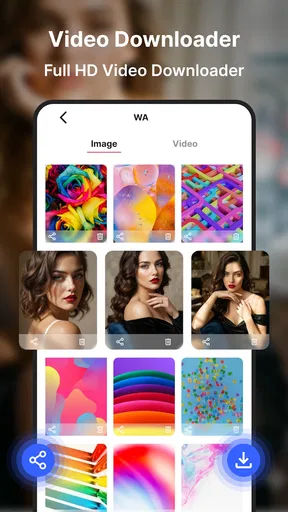
Another thing worth mentioning is the built-in file manager. It organizes your downloads neatly, allowing you to easily find and manage your videos. You can even sort them into folders or rename them for better accessibility.
Final Thoughts
After spending a good chunk of time with this app, I can confidently say it’s a must-have for anyone who loves downloading and watching videos offline. With its seamless functionality, range of features, and no-nonsense design, it ticks all the right boxes.
Whether you're commuting, on a long flight, or just want to save data, this app ensures your favorite content is always just a tap away. So, if you’re on the hunt for a reliable and efficient video downloader, give this one a shot. Trust me, your future self will thank you.
Pros
- Supports multiple video formats seamlessly.
- Fast download speeds enhance user experience.
- User-friendly interface for easy navigation.
- Allows offline playback of downloaded videos.
- Free to use with no hidden charges.
Cons
- Contains ads that can be intrusive.
- Limited support for 4K video downloads.
- Occasional crashes on older devices.
- Requires permissions that may concern privacy.
- No option for background downloads.
FAQs for All Video Downloader HD Player
What video formats does All Video Downloader HD Player support?
All Video Downloader HD Player supports a wide range of video formats, including MP4, AVI, MKV, FLV, and 3GP. This ensures that users can download and play videos from various sources without worrying about compatibility issues. It's always a good idea to check the latest app updates for any new supported formats.
Is it legal to download videos using All Video Downloader HD Player?
The legality of downloading videos depends on the source and purpose of the download. It's crucial to respect copyright laws and terms of service of video platforms. Users should ensure they have the right to download, especially for copyrighted content, to avoid any legal issues.
Does All Video Downloader HD Player require an internet connection to play downloaded videos?
No, once videos are downloaded using All Video Downloader HD Player, they can be accessed and played offline. This feature is particularly useful for users who want to watch content without an active internet connection, making it ideal for traveling or areas with limited connectivity.
Are there any in-app purchases or subscription fees in All Video Downloader HD Player?
While All Video Downloader HD Player is free to download, it may offer in-app purchases or a subscription model for advanced features, such as ad-free experiences or higher download speeds. Users should review the app's details on the app store for any potential costs associated with these premium features.
How user-friendly is the interface of All Video Downloader HD Player?
The app is designed with user-friendliness in mind, featuring an intuitive interface that allows users to easily navigate through its features. The search and download functions are straightforward, making it accessible even for those who are not tech-savvy. However, user experience can be subjective, and feedback may vary.


